
Menu
▾
▴
1 Attachments
#976 There is a problem with new versions of Megui with VC-1
https://sourceforge.net/p/megui/feature-requests/686/?page=4&limit=25#e4bd
https://sourceforge.net/p/megui/feature-requests/686/?page=4&limit=25#2e5c
@Ho Quoc Viet
Yes, I downloaded them, they are already updated. Your archives have perfect settings for me. I respect that you keep them up to date.
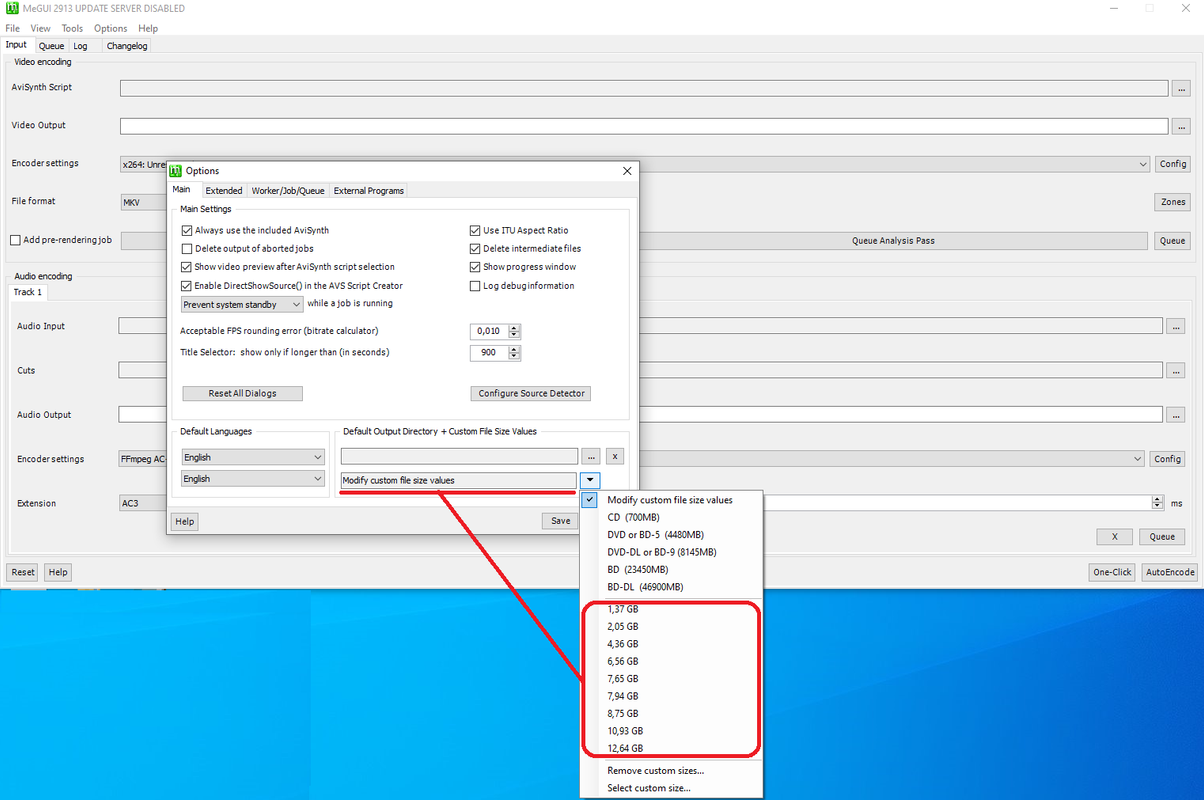
But basically how do I most easily transfer from my version to yours just "Modify custom file size values"?
@Ho Quoc Viet, I tested AVC with your MeGUI-2936-32 - everything is fine.
Since yesterday and today I am testing with the movie: Where Eagles Dare 1968 BD50 1080p VC-1 DTS HD-MA 5.1 in - > Blu-Ray 1080p x264 DTS.
@Ho Quoc Viet, @Barough, @Zathor and the others.
There is a problem with new versions of Megui with VC-1.
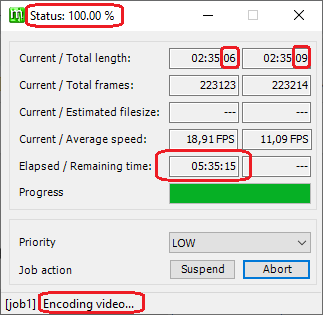
@Ho Quoc Viet, I tested VC-1 with your MeGUI-2936-32 and again Pass 1 has no end. I am using x264 for the output mkv.
I intentionally left it for a few hours, but Pass 1 has no end. MeGUI-2936-32 can't pass to Pass 2. I have no idea which version this issue started from. Just confirming that Megui 2913 is not affected and works successfully with VC-1. So codecs have no negative impact.
I am attaching a photo:
Guys, can anyone test encoding with Blu-Ray VC-1 with x264 output codec and confirm about the issue?!
@Zathor?!


While testing I noticed that I do have no issues in creating such a video (vc1 input, 2-pass output with x264) but I found a bug that when doing so with OneClick not the proper bitrate is set to reach the desired file size. I need to check why and likely will release a fix for that.
Beside that I noticed in your log file that those files are not the ones provided by MeGUI:
AviSynth, AviSynth Wrapper, MediaInfo, 7z
Also I would suggest not to open that m2ts file directly with DSS2 but with an indexer. E.g. use the file indexer tool to create that for you.
Last edit: Zathor 2023-04-07
Indexing itself can take 20 minutes or so.
@Zathor, I suggest not experimenting with "OneClick".
This is how I do it, I suggest you reproduce my steps:
Tools - > AVS script creator - > video input - and select the m2ts file directly. No need to crop. You save the script. No need to test with audio, but as you choose. Then - keyboard shortcut Ctrl + B. You define either manual video bitrate or set a final size for it. And then start the encoding process (with 2 pass of course). Output to be x264.
And pass 1 has no end.
Honestly - I have no idea how anyone used MediaInfo in Megui?! Can someone explain?! I don't see where or how you use MediaInfo in Megui.
@Zathor, since Megui 2913 the new versions regarding VC-1 to x264 are broken and it is noticeable in the infinite as pass 1 process.
I claim that the Megui 2913 works flawlessly with VC-1 and without indexing (as you advise me). It was tested twice yesterday.
Basically, indexing (which you advise me on) takes too much time and I have ONLY used it when encoding DVDs. Not to repeat myself, but I honestly don't know of anyone indexing Blu-Ray 50 (BD50) or Blu-Ray 100 (BD100). I don't want to imagine anyone indexing UHD.
@Zathor, any way to export the "Modify custom file size values" settings? As in the first post I have attached the picture with the fixed sizes - from 1,37 GB to 12,64 GB - to have import/export of these settings.
/Please provide an option to disable the splash screen - the new logo that appears when starting Megui. At least I didn't see in the settings that there was an option to turn it off./
Please try version 2937. It should fix the bitrate issue and maybe it will also help with the issue you see there.
Beside that I am not going to support DSS2 or the other file versions you have there as it would take too much time for me doing so.
I therefore suggest you test it may way. Easiest way is you download and install a second copy of MeGUI into a new folder and only use the files provided by that.
What issue do you have with the splash screen?
As for the splash screen - I'm all about the simple stuff. Everyone has their preferences. The important thing is that there is a choice - whoever likes it - to keep it.
I completely re-downloaded Megui - here from the site. I updated to version 2937.
I accelerated the endcoding process as much as possible at the moment (without any perfectionism, just for experiment).
What do you mean by "DSS2"?!
Maybe "direct show source 2"?! Initially I have nowhere to trigger DDS2. Except here (without indexing):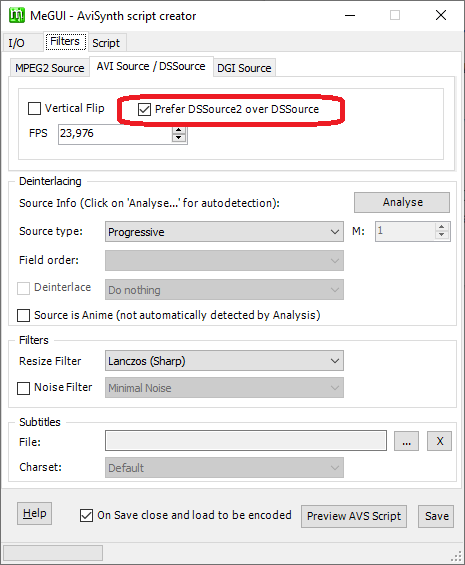
If you can show with a photo exactly so that I can understand you.
You did not comment on the export and import settings for the modified output size of the finished file. It should be understood that the proposal was rejected.
Another issue that has been lingering since version 2913:
I doubt I'm the only one who noticed it, but no one else mentions it.
I. When cropping - on the right, the vertical pillar (let's put it this way) is minimal, barely visible. I am attaching a photo and surrounding it in red.
II. The bottom left of the picture https://i.postimg.cc/x1VCmgjX/pff.png are also cropped and the bottom edge of these menus are cropped.
Last edit: seagate 2023-04-07
The issue is not resolved with version 2937 which was downloaded from here site and unzipped into a new folder and updated.
The error is the same again. It's not even an error because it doesn't say an error anywhere. Again, pass 1 has reached 100% and is not finished according to Megui 2937, so it doesn't go to pass 2.
What I wrote before - there is something broken in updates in versions after version 2913. It turned out to be the last one working with VC-1.
Last edit: seagate 2023-04-07
for .m2ts, i think ffms, DGDecNV and L-SMASH-Works better than dss2
By indexing (file indexer)?!
Last edit: seagate 2023-04-07
yes
Actually DGDecNV is not officially present on Megui in clean update.
Ok, I'll test with ffms first. And if it still doesn't work, I'll test with L-SMASH-Works after that.
Last edit: seagate 2023-04-07
You can turn on DGdexNV in option
Yes, I know it's there. I meant that by definition it is not enabled.
And basically I don't know in which cases to use ffms, DGDecNV and L-SMASH-Works or which of them is preferable as a basis for use.
all of them always better than directshowsource or dss2 cause they always are updated to new ver
You're probably right, but indexing takes ~20 minutes for a Full blu-ray disc.
I only used the indexing for DVDs.
I'm waiting for indexing to start then pass 1. :}
@Ho Quoc Viet, do you experience this too? It should be this way with you too, it can't be any different.
to see full you need click fit in bottom left
Click on the bottom left?! Can I have a photo?!
I'll test it in a bit. But I think I have clicked and it stays as seen. The cursor is barely grasped to slide up or down. It's inconvenient for me that way as it is now.
do you see "Fit" button on the bottom left??
I guessed before you wrote it.
But at 1:1 it's disgusting as it is right now.
This needs to be corrected. It wasn't so bad in previous versions.
Indexing using FFMSindex.
After indexing with FFMSindex (17 minutes) - pass 1 complete. The problem for me is that my CPU cores were only being used between 19% and 21%. pass 2 I waited 6 minutes for it, but with it the CPU cores were also only used between 19% and 21%. More familiar to explain why the full potential is not used to 100%. Naturally, the encoding became very slow and I am not satisfied with that.
Indexing using DGindexNV.
It couldn't even start and I'm attaching a picture of the error:
@Ho Quoc Viet and @Zathor, how to solve this problem to use DGindexNV?!
@Zathor, I ran into another problem besides the picture above for the right pillar, that it is barely visible to move up and down.
If I index regardless of whether it will be with FFMSindex or with DGindexNV and immediately go back to select a folder - the last used folder is not remembered and follows a walk through partitions, folders... It does not always remember the last used folder.
Now it remains the last possible experiment with indexing using L-SMASH-Works. After indexing, which took 19 minutes, I ran pass 1. Here again CPU cores are being used between 10% and 20% (even with the browser on). Clearly, it will take a long time to encode. Although in the program settings I set ULTRA FAST. And it is still not clear why 100% of the CPU cores are not soldered. Whether it will go to pass 2 or not - it doesn't really matter, because...
Conclusion: Megui version 2913 works flawlessly with VC-1 (with or without indexing) and uses 100% of CPU cores (on me).
For comparison.
Both pictures are from version 2913.
You can see how it was before the updates in the Megui versions.
At the bottom left is the "Go to frame" menu and how below it there is a space left that in the new versions is cut out, that even the bottom edge of the rectangle of the "Go to frame" menu is cut out (in the new versions).
The other difference is the vertical pillar on the right - it is marked with a red arrow. A wide enough vertical bar used to be comfortable to move with the mouse cursor. The width of the pillar on the right is equal to the horizontal pillar below - it is circled in red to visualize this clearly enough.
The right side and the bottom should now be fully visible or do you still have issues with version 2941, @seagate?
Are you able to upload a small part of that file which causes the issue for you?
About the DGIndexNV issue you are seeing there: which Nvidia model do you have installed in your system?
@zathor
I'm currently using an Nvidia 9800 GT.
As for version 2941, which you write about, it has not yet officially arrived on the development server:
On version 2940, the right pillar problem is still almost hidden.
Regarding the file you are asking about, I may cut a piece of it and upload it to some site, but I will do it in maybe ~10 hours. I'm currently dealing with 1,4 TB and don't have that time right now.
Last edit: seagate 2023-04-14
Based in the DGIndexNV page you need at least a 500 series card. Yours is sadly some years older.
The fix for the VideoPlayer size is in 2941 which should now be available. I have not tested it with scroll bars so I am interested in the results.
And yes, please, a small file (ideally < 1 GB) with which you do have that encoding issue.
The update to 2941 has appeared.
But again the right pillar is barely visible and there is no positive change in it. I mean the horizontal pillar is not the same width as the vertical pillar - I've circled them in red for a visual comparison. In version 2913, the horizontal post and the vertical pillar are the same width.
The only improvement is that the "Go to frame" menu at the bottom has been moved and is in place as it was in version 2913.
Before you specify what file size to prepare - my idea was also to make it up to 1 GB and 75 minutes ago I had it prepared, but I'm doing something else and I'm late to post my comment.
I suggest that you personally test with the file I uploaded (I have intentionally left it with only 1 audio stream) and do an encoding to mkv x264 1080p with two Passes. You can test without Indexing. As I wrote you this worked in version 2913 flawlessly.
https://krakenfiles.com/view/iiSesksd0Z/file.html
https://bayfiles.com/Ydh20bl6z7/00009_005_mkv
(Where Eagles Dare 1968 BD50 1080p VC-1 DTS HD-MA 5.1)
Last edit: seagate 2023-04-15