Ok, I am playing around first time with gcb. I'using PIC18F25K22 (StartPic18 PCB) and using it's 8x2 Char LCD Display.
It's working so far. But I asume the Compiler doesn't know for Display Width, right?
I would expect a #define for Length, LCD_Width = 8, 16,20 i.e.
Ok, one could pay attention for it, it seems or Char are simply cut?
A huge thank You for all of the people made this possible.
I'm sure I will stay on board for my next projects.
By the way, there exists a pretty fine German Manual as well, do you already know?
Download from here: http://ls-systemtechnik.de/gcbasic.html
If you would like to refer to this comment somewhere else in this project, copy and paste the following link:
Welcome. Thanks for the feedback. This is acommunity effort and the German translation is an example of the effort others put in.
The LCD. You are correct. The LCD driver does not handle the width of characters, in terms of the number of characters sent to the device. If you exceed the devices display width the characters are sent to the device and the internal buffermemory in the device is updated.. you just will not see the results. In some cases you will see these characters as you push sufficient characters into the buffermemory of the device. You essentially overrun to the next line of the device.
Here is a buffer/memory map for your review
If you have an idea on how we can adapt the LCD library to support this via a Define or other method then please have a go and share you results.
If you would like to refer to this comment somewhere else in this project, copy and paste the following link:
After thinking twice about my concern I already guess this behavior, its ok. Thank You very much for this illustration.
Btw: in Sources/GreatCowBasic.acp:-> LCD_Speed |FAST | MEDUIM | SLOW
What is .acp stand for? Autocomplete? I guess its a mispelling :-) even in the 0.97.1 Windows all_in_one
If you would like to refer to this comment somewhere else in this project, copy and paste the following link:
Remember I'm a Linux Guy, this Version is 0.96. ;-)
Ohh, I evaluated gcbasic IDE with wine, which is working and looks very nice. But I'm using geany, which is my tool of choice normally.
If you would like to refer to this comment somewhere else in this project, copy and paste the following link:


Ok, I am playing around first time with gcb. I'using PIC18F25K22 (StartPic18 PCB) and using it's 8x2 Char LCD Display.
It's working so far. But I asume the Compiler doesn't know for Display Width, right?
I would expect a #define for Length, LCD_Width = 8, 16,20 i.e.
Ok, one could pay attention for it, it seems or Char are simply cut?
A huge thank You for all of the people made this possible.
I'm sure I will stay on board for my next projects.
By the way, there exists a pretty fine German Manual as well, do you already know?
Download from here: http://ls-systemtechnik.de/gcbasic.html
Welcome. Thanks for the feedback. This is acommunity effort and the German translation is an example of the effort others put in.
The LCD. You are correct. The LCD driver does not handle the width of characters, in terms of the number of characters sent to the device. If you exceed the devices display width the characters are sent to the device and the internal buffermemory in the device is updated.. you just will not see the results. In some cases you will see these characters as you push sufficient characters into the buffermemory of the device. You essentially overrun to the next line of the device.
Here is a buffer/memory map for your review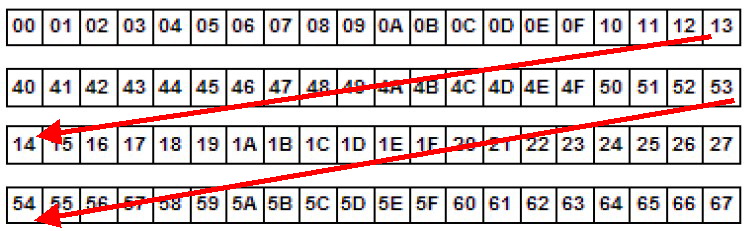
If you have an idea on how we can adapt the LCD library to support this via a Define or other method then please have a go and share you results.
After thinking twice about my concern I already guess this behavior, its ok. Thank You very much for this illustration.
Btw: in Sources/GreatCowBasic.acp:-> LCD_Speed |FAST | MEDUIM | SLOW
What is .acp stand for? Autocomplete? I guess its a mispelling :-) even in the 0.97.1 Windows all_in_one
Nice spot on the typo. Will update.
ACP is the autocomplete for the IDE. Correct again. :-)
You should update to the latest build. We will make a release soon - wait until then.
Remember I'm a Linux Guy, this Version is 0.96. ;-)
Ohh, I evaluated gcbasic IDE with wine, which is working and looks very nice. But I'm using geany, which is my tool of choice normally.
OK. We publish the Help to aid Linux users.
When we release v0.98.00 very soon it will be good to get you guys to test the Linux build.
You can count on me.
I'm in a quest to build a birthday present, so I'm sure I've my hands on in the next weeks :-)