
Menu
▾
▴
A database of sorts

I don't like SQL
I didn't do any database programming until I was hired as a database programmer. Don't ask me how that works, you know, skills and experience and stuff, but that's how it happened. I never found database programming very challenging. If you're not working on the user interface, you're just moving data around. Boring.
Still, thirty years later I think no programming language can really do without a database, so I had to come up with one for 4tH. Yes, many programmers "solve" this problem by simply making an interface to MySQL or SQLite and although I find that perfectly acceptable, it was not the first thing that sprung in mind.
The problem is: I hate SQL. For several reasons. If it is embedded, you have to learn an additional language, named SQL. And there is an optimizer between my query and the output it produces, which usually requires carnal knowledge to get it right. As a language, SQL has got close to a hundred fundamental problems. But most importantly, it's has no lexical binding.
That means that whatever is returned by the query, you have to take additional actions to transport these values to local variables, like this:
while (SQLFetch ($cur)) {
    $nbrow++;
    $Regel= SQLColumn ($cur, 1 );
    $CINaam= SQLColumn ($cur, 2 );
    $AltNaam= SQLColumn ($cur, 3 );
    $Opmerkingen= SQLColumn ($cur, 4 );
    $Status= SQLColumn ($cur, 5 );
    $CIType= SQLColumn ($cur, 6 );
    $Veld1= SQLColumn ($cur, 7 );
    $Veld2= SQLColumn ($cur, 8 );
    // do some more stuff ..
}
And I don't like that. I like databases the way they were in 1984, when I was using DataFlex. It was very simple and it worked. Once you opened a database table, it's layout became lexically part of your program as if it were a structure.
This structure had one instance, the buffer. To add a record, you cleared the buffer, filled it with your data and issued an INSERT. To retrieve a record, you cleared the buffer, filled it with your search criteria and issued a FIND. To delete a record, you first retrieved it and then issued a DELETE. To modify a record, you retrieved it, altered the data and issued an UPDATE. It's a very natural way of working. That's what I wanted.
The basic architecture
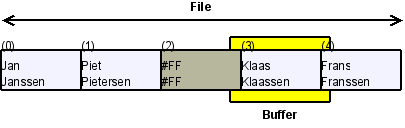
So I started with the buffer. Instead of using a full fledged dictionary, I decided to use some plain old structures to define the buffer. 4tH always returns the size of a structure after definition, so it seemed logical to write entire buffers to disk - and not individual fields. Hence, the size of the record was equal to the size of the buffer. It also made sense to just mark a deleted record and ignore any deleted records when inserting a new one. Just append it, much faster and much easier.
This was enough to create a barebone database management system:
- It's no rocket science to navigate from a known file position - either forward or backward. You simply multiply the number of records with the buffer size and issue an fseek() accordingly;
- There is no guarantee whatsoever that records are in any particular order. If you have to find something, you need to do a full table scan;
- If you found a record, you can modify it, since you now know its position. Deleting a record means filling the buffer with #FF values and do an update;
- "Inserting" is simply appending a buffer at the end of the file.
Although I had discarded a traditional dictionary, I still needed some facility to bind the components of a "table" - the buffer and the database file - together. A simple structure did the trick. The first word I wrote for this library was meant to initialize it.
Skyscraper /Skyscraper s" skyscrpr.dbm" db.declare to Sky
No, there are no table names. Instead, it returns a table reference, which is primarily used to select and activate a table:
Sky db.use
It doesn't really matter that there is no true dictionary, since you can put all the definitions in an include file. If a program wants to use a specific table definition one can simply include the appropriate file. That may not seem like much, but it takes a lot of hassle to manage these structures centrally on disk. And this does nearly the same thing.
It still lacked indexes, though. But anyway, we were working on that one.
Adding indexes
It is important to understand that I wanted some kind of database functionality. I wasn't out to design the next SQLite. I quickly discovered that maintaining disk based indexes was no walk in the park - especially not if you wanted to keep the entire operation reasonably fast. This tiny system was meant to work with thousands of records, not millions.
So one morning I woke up and realized that I could make my life a heck of a lot easier it I kept indexes in-memory. And that's what I did. And why not? Go figure. You got a table with 10,000 records. On a 32-bit machine that translates to 4 bytes per record. Total size: less than 40KB. Duh.. On top of that, I didn't need to open an extra file - which is a definite advantage on a system that doesn't support that many file handles.
After that it was pretty straight forward. I just had to add some housekeeping information and that was it. I didn't waste much time on writing an index to disk, I simply punched out the record numbers. In ASCII, that is. Nothing is faster than a binary search, which of course requires a sorted dataset.. Which is exactly what an index is, of course.
BTW, if you include an address based sort routine before you include the index library, you can create indexes for already existing databases.
Now what's needed to make an index perform its magic? Not much. How many entries there are in an index and how many are used. The field that is indexed and the routine needed to compare values of that type (call it a "method" and see how much I care). And finally the current position in the index (required for IDX.NEXT and IDX.PREVIOUS) and the last error that was triggered.
Of course, there were still a few drawbacks. There was no "compound index", since there could only be one field per index. You could work around that one by adding a field which combined both fields. And it was irritating you had to manually update the indexes after you'd updated the record itself, e.g.:
begin
  refill
while
  db.clear
    Field> db.buffer -> Rank      place
    Field> db.buffer -> Name      place
    Field> db.buffer -> City      place
    Field> db.buffer -> Country   place
    Field> db.buffer -> Height_m  place
    Field> db.buffer -> Height_ft place
    Field> db.buffer -> Floors    place
    Field> db.buffer -> Built     place
  db.insert

  Sky.Name    idx.insert drop          \ update index, drop flag
  Sky.Height  idx.insert drop          \ update index, drop flag
  Sky.City    idx.insert drop          \ update index, drop flag
  Sky.Country idx.insert drop          \ update index, drop flag
  Sky.Rank    idx.insert drop          \ update index, drop flag
  Sky.Floors  idx.insert drop          \ update index, drop flag
  Sky.Built   idx.insert drop          \ update index, drop flag
repeat
That was not only ugly, but also very error prone. I decided to make an (optional) extension to the dictionary to fix that one. However, if you're using this subsystem, it's mandatory to bind and release all your indexes of all your tables, otherwise you might run into trouble releasing them:
s" ustates.dbm" db.create
UState /UState  s" ustates.dbm" db.declare to US
US db.use

128 {char} db.key State idx.init abort" Cannot create 'State' index"
to US.State

128 {char} db.key Capital idx.init abort" Cannot create 'Capital' index"
to US.Capital

US.State US.Capital 2 dbs.bind abort" Cannot bind indexes"

s" ustates.csv" input open
error? abort" Cannot open 'ustates.csv'"
dup use

refill 0= abort" Cannot read 'ustates.csv'"

begin
  refill
while
  db.clear
    Field> db.buffer -> State      place
    Field> db.buffer -> Abbr       place
    Field> db.buffer -> Capital    place
    Field> db.buffer -> Population place
    Field> db.buffer -> Area       place
    Field> db.buffer -> Seats      place
  dbs.insert
repeat

dbs.release abort" Cannot release indexes"
This system has been used several times now, mostly in professional environments. Compiled it is so tiny that people wonder how we crammed an entire DBMS in there. Apart from that, it is easy to use and pretty flexible. Recently I learned how to add "sequences", fields that auto increment. As a matter of fact, it is quite simple:
variable seq1 0 latest ! does> 1 over +! @ ;
variable seq2 0 latest ! does> 1 over +! @ ;
variable seq3 0 latest ! does> 1 over +! @ ;

db.clear
  seq1    db.buffer -> Sid n!
  Field>  db.buffer -> Name place
dbs.insert
In short, you create and initialize a dedicated variable. When it is called it increments automatically and leaves that number on the stack. It's dead simple, when you come to think of it.
I'm confident that the more this tiny DBMS is used, the more enhancements will come up. But for the time being I'm quite happy. At last I can navigate through a database in the way god intended: simply by using IDX.NEXT and IDX.PREVIOUS. What more can you want ;-)
