
Menu
▾
▴

PointTracker

PointTracker
Many users asked us, if it would also be possible to merge the IR-tracker of FreeTrack into FaceTrackNoIR. Many already have a headset (3-point model) and would like to use the advanced features offered by FaceTrackNoIR combined with the fast IR-tracking of FreeTrack. Though the name clashes a bit with the "NoIR" part in the name FaceTrackNoIR, Patrick made this conversion of PointTracker.
If you have questions, remarks or compliments you want to share with us, please post them here: [discussion:pointtracker]
Advantages
The great advantage of IR-tracking compared to face-tracking is the fact that only a few points (mostly 3 IR-leds) need to be tracked. This requires much less CPU-power than face-tracking. So this will offer either a lower CPU-load (giving 'the game' more power) or the tracking-frequency can be higher (giving higher accuracy).
Drawbacks
IR-tracking can be difficult, when the environment of the user is too brightly lit or if light-sources are located behind the user. Also, a 3-point model must be made to which IR-leds are attached. Examples and descriptions of how to make such a model can be found here on FreeTrack.
Settings
A full explanation of the settings can be found here on sourceforge
The Settings-screen of PointTracker looks like this:
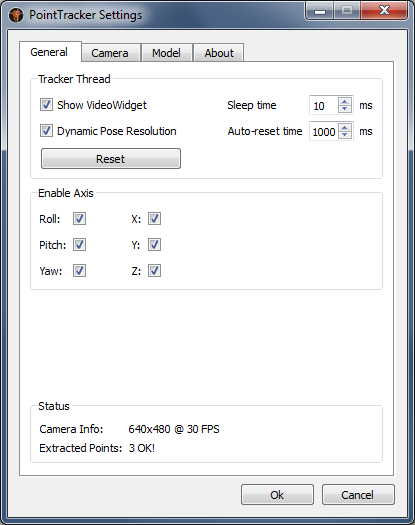
Using the Enable axis checkboxes each of the 6 DOF's can be enabled or disabled. Disabled means, that the output value will not be sent to FaceTrackNoIR.

