cn1-offline-android-nb Wiki
Android offline build Netbeans plugin for CodeName One
Brought to you by:
arsiskk


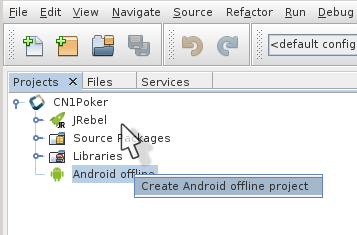
The source codes are synchronized by pressing the save button.
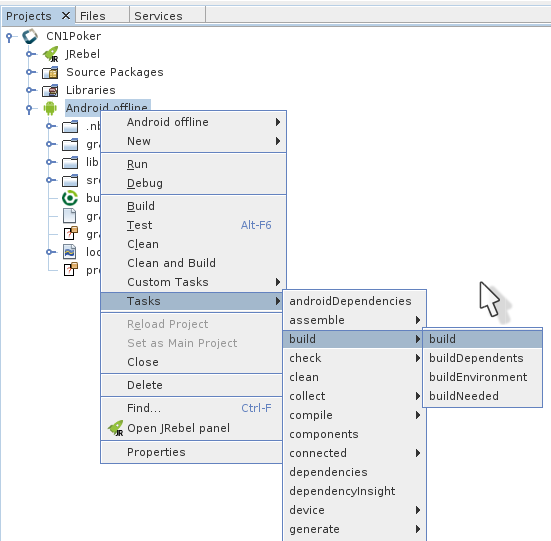
There is no control of external changes, for external changes, you need to manually sync:

After adding or removing library, you need to manually sync:


git clone http://github.com/codenameone/CodenameOne
git clone http://github.com/codenameone/codenameone-skins
Download the cn1-binaries project from github here.
Unzip the cn1-binaries project and make sure the directory has the name cn1-binaries. Verify that cn1-binaries, CodenameOne and codenameone-skins are within the same parent directory.
Open project CodenameOne/Ports/Android in Netbeans IDE
Next Project properties -> Libraries
Remove the library google-play-services.jar

Add from cn1-binaries folder jars:
play-services-auth-8.3.0.jar
play-services-base-8.3.0.jar
play-services-basement-8.3.0.jar
play-services-location-8.3.0.jar
play-services-plus-8.3.0.jar

Compile the project and your cn1-android.jar is ready to use..




hi in my windows netbeans is this error on build android:
org.gradle.tooling.GradleConnectionException: Could not create an instance of Tooling API implementation using the specified Gradle distribution 'http://services.gradle.org/distributions/gradle-2.11-all.zip'. and several error.
please help me.please help me.
Last edit: mamad loo 2017-11-03
Last edit: ramsestom 2018-03-09
I generated my own cn1-android.jar but had to keep the google play service jar in it so that some cn1libs can work (like native maps)
Also, I didn't download the cn1-binaries project from github as a zip and but did a git clone of https://github.com/codenameone/cn1-binaries/ like the others and it works well
Last edit: ramsestom 2018-03-09