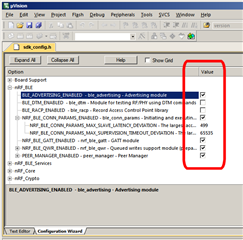
It would be good if the "tree" view could include an indication of how each "node" is set - as, for example, the Keil uVision Configuration Wizard does:
If you would like to refer to this comment somewhere else in this project, copy and paste the following link:




Currently, the "tree" view gives(or seems to give?) no indication of how each "node" is set; eg, enabled or disabled.
To see the setting of a "node", you have to select it in the "tree" view, and then look at the setting at the bottom of window:
This makes it very laborious when trying to see a number of settings - or when trying to compare 2 configuration files.
Cross-post: https://devzone.nordicsemi.com/f/nordic-q-a/45362/cmsis-configuration-wizard---option-highlighting
It would be good if the "tree" view could include an indication of how each "node" is set - as, for example, the Keil uVision Configuration Wizard does:
Hi,
Thanks for your feedback - yes this is indeed a feature that needs to be added. I'll try and devote some time to getting this implemented.