Did you try Clonezilla live >= 2.6.7-28 or 20200703-focal and choose the 2nd item "KMS with large font & To RAM" in the boot menu? https://clonezilla.org/downloads.php
Steven
If you would like to refer to this comment somewhere else in this project, copy and paste the following link:
Not sure if this is the right place, but I wanted to share with everyone that you can change the resolution of Clonezilla GRUB boot screen.
I have a DELL XPS 15 as well.
Yes, I agree, booting up with Clonezilla Live CD, with the defaults, on a high res screen, it is almost impossible to read the menu (especially being a short-sighted person like me) .
The searches on the forum or internet only lead to either:
a) Use "KMS with large font & To RAM" option
(yeah ok, but that's AFTER the initial menu, I gotta be able to read the menu first, before I can select that option);
In the end, I thought, heck, there must be a graphic or font settings somewhere in the grub.conf that I can change.
If you look at Boot > Grub > Grub.conf
About line 18
"
if loadfont $pref/unicode.pf2; then set gfxmode=auto
insmod gfxterm
"
where it says set gfxmode=auto, change the word auto to something like 640x480 or 1024x768, or whatever resolution you want.
Save the file and reboot.
You should be able to read the Clonezilla boot menu now.
Hopefully this info will help someone out there.
👍
1
Last edit: Chief 2021-06-08
If you would like to refer to this comment somewhere else in this project, copy and paste the following link:
Chief, Thank you so much for this simple fix. It works. I have an update as of 19 Feb 2024.
1. Prepare a USB flashdrive by creating a 600 MB partition formatted to FAT32. Assign the drive a letter, for example, “E:.”
2. Open https://clonezilla.org/downloads.php.
3. Click alternate stable - 202401116-mantic.
4. Select CPU architecture amd64.
5. Select file type zip.
6. Click Download.
7. Extract the downloaded file--clonezilla-live-20240116-mantic-amd64.zip—to the root directory E:.
8. On the flashdrive backup E:\boot\grub\grub.cfg.
9. With Wordpad open E:\boot\grub\grub.cfg.
10. Change the line "set gfxmode=auto" to "set gfxmode=1920x1080."
11. Save E:\boot\grub\grub.cfg as plain text document.
12. Restart and boot from the USB flashdrive as you normally would. See the Clonezilla banner screen with font you can read.
13. Select “Clonezilla live VGA (800x600) [sic].”
14. Proceed as you normally would.
👍
1
Last edit: Gregor Spinney 2024-02-19
If you would like to refer to this comment somewhere else in this project, copy and paste the following link:
Have you tried the latest Clonezilla live? i.e., 3.3.0-33 or 20251017-questing? https://clonezilla.org/downloads.php
We implemented a way to detect the screen size and automatically adjust the font size. It should work better now. Please give that a try if you haven't use that release.
If you would like to refer to this comment somewhere else in this project, copy and paste the following link:
I just tried to boot into questing again and when it starts logging to console, you can indeed see Clonzilla use a bigger font when it starts logging to console (0:22) for about 3 lines and then it falls back to the original tiny font (you can skip to 0:20 as it takes awhile):
From the video, it seems the boot menu reads like the following:
Boot Menu Options
Clonezilla live (VGA 800x600)
Clonezilla live (VGA 800x600 & To RAM)
Clonezilla live (VGA with large font & To RAM)
Clonezilla live (Speech synthesis)
Other modes of Clonezilla live
Local operating system (if available)
Memtest86+ (VGA 800x600 & To RAM)
FreeDOS using Memdisk
Network boot via iPXE
uEFI Firmware Setup
Clonezilla live 2.6.2-15-amd64 info
To me the version number is Clonezilla live 2.6.2-15? Are you sure you use Clonezilla live >= 3.3.*?
If not, please give latest Clonezilla live >= 3.3.1-10 a try: https://clonezilla.org/downloads.php
If you would like to refer to this comment somewhere else in this project, copy and paste the following link:


When I boot clonzilla on my xps15 with a 4k screen the font size is too small to be legible. Is there some way of making it larger?
Did you try Clonezilla live >= 2.6.7-28 or 20200703-focal and choose the 2nd item "KMS with large font & To RAM" in the boot menu?
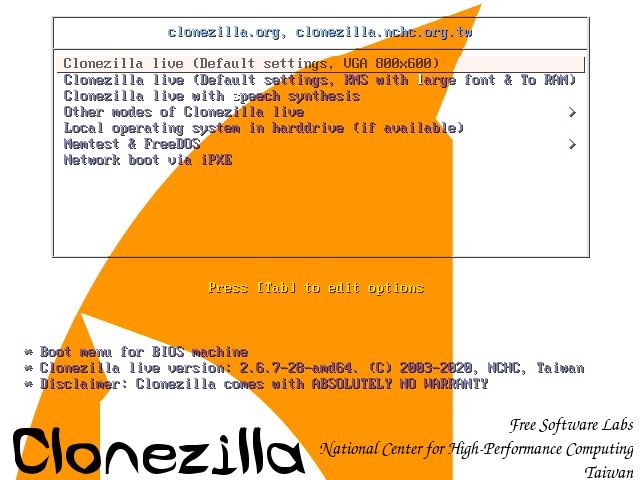
https://clonezilla.org/downloads.php
Steven
Not sure if this is the right place, but I wanted to share with everyone that you can change the resolution of Clonezilla GRUB boot screen.
I have a DELL XPS 15 as well.
Yes, I agree, booting up with Clonezilla Live CD, with the defaults, on a high res screen, it is almost impossible to read the menu (especially being a short-sighted person like me) .
The searches on the forum or internet only lead to either:
a) Use "KMS with large font & To RAM" option
(yeah ok, but that's AFTER the initial menu, I gotta be able to read the menu first, before I can select that option);
b) Make your own Grub font size with grub2-mkfont
(which I couldn't get it to work, because the standard GRUB structure and Clonezilla Grub structure are different, and I am too dumb to figure it out)
example tutorial: https://unix.stackexchange.com/questions/31672/can-grub-font-size-be-customised
In the end, I thought, heck, there must be a graphic or font settings somewhere in the grub.conf that I can change.
If you look at Boot > Grub > Grub.conf
About line 18
"
if loadfont $pref/unicode.pf2; then
set gfxmode=auto
insmod gfxterm
"
where it says set gfxmode=auto, change the word auto to something like 640x480 or 1024x768, or whatever resolution you want.
Save the file and reboot.
You should be able to read the Clonezilla boot menu now.
Hopefully this info will help someone out there.
Last edit: Chief 2021-06-08
Chief, Thank you so much for this simple fix. It works. I have an update as of 19 Feb 2024.
1. Prepare a USB flashdrive by creating a 600 MB partition formatted to FAT32. Assign the drive a letter, for example, “E:.”
2. Open https://clonezilla.org/downloads.php.
3. Click alternate stable - 202401116-mantic.
4. Select CPU architecture amd64.
5. Select file type zip.
6. Click Download.
7. Extract the downloaded file--clonezilla-live-20240116-mantic-amd64.zip—to the root directory E:.
8. On the flashdrive backup E:\boot\grub\grub.cfg.
9. With Wordpad open E:\boot\grub\grub.cfg.
10. Change the line "set gfxmode=auto" to "set gfxmode=1920x1080."
11. Save E:\boot\grub\grub.cfg as plain text document.
12. Restart and boot from the USB flashdrive as you normally would. See the Clonezilla banner screen with font you can read.
13. Select “Clonezilla live VGA (800x600) [sic].”
14. Proceed as you normally would.
Last edit: Gregor Spinney 2024-02-19
It's 2025 and my eyes have officially aged and glad to hear some people have this working!
I was very hopeful and wasn't able to get this to work just now.
I modified the line in question in a stable (3.1.3) release I had already on my active Clonezilla USB stick (FAT32):
Booted into it but same small font as usual 😑
Tried the
KMS with large font & To RAMoption (w/o the modification) and this didn't work either 🙄For the record, I am booting into an x86 MBP 2015 (and where we really need it is on our 2017 iMac with the 4k Retina screen! 🔍)
Clonezilla has been a lifesaver so many times - I hope support for the aging population is integrated in a future release 🙏🏼
Last edit: udance4ever 2025-10-26
Have you tried the latest Clonezilla live? i.e., 3.3.0-33 or 20251017-questing?
https://clonezilla.org/downloads.php
We implemented a way to detect the screen size and automatically adjust the font size. It should work better now. Please give that a try if you haven't use that release.
so great to hear you're working on this!
I just tried to boot into
questingagain and when it starts logging to console, you can indeed see Clonzilla use a bigger font when it starts logging to console (0:22) for about 3 lines and then it falls back to the original tiny font (you can skip to 0:20 as it takes awhile):https://youtu.be/WhFrCC27pvQ?si=sWG3_kCNoolKFR0G
Last edit: udance4ever 2025-11-13
From the video, it seems the boot menu reads like the following:
Boot Menu Options
Clonezilla live (VGA 800x600)
Clonezilla live (VGA 800x600 & To RAM)
Clonezilla live (VGA with large font & To RAM)
Clonezilla live (Speech synthesis)
Other modes of Clonezilla live
Local operating system (if available)
Memtest86+ (VGA 800x600 & To RAM)
FreeDOS using Memdisk
Network boot via iPXE
uEFI Firmware Setup
Clonezilla live 2.6.2-15-amd64 info
To me the version number is Clonezilla live 2.6.2-15? Are you sure you use Clonezilla live >= 3.3.*?
If not, please give latest Clonezilla live >= 3.3.1-10 a try:
https://clonezilla.org/downloads.php
So if you continue it after selecting language and keyboard, is the font size bigger?
Like what has mentioned here?
https://github.com/stevenshiau/clonezilla/issues/166
I went through the menus to "Start Clonezilla" (using the
questingrelease) and the font remains small like it is in the video.udance4ever: Did you try the grub.cfg edit with clonezilla-live-20240116-mantic-amd64.zip? Check my post above and follow the instructions exactly.
manticis no longer available so I tried your steps with a stable release (3.1.3) (and20251017-questing) and it didn't work for me.Last edit: udance4ever 3 days ago