The -ps option does not working.
A partition and disk imaging/cloning program
Brought to you by:
steven_shiau

Goog day!
I have been testing recently clonezilla-live-3.1.0-22-amd64.iso (Stable, Debian based). System: Acer Aspire E1-522.
While making full system backup (device-image ----> local_dev), I have choosen the -ps option (Play sound when the job is done).
The full command was:/usr/sbin/ocs-sr -q2 -c -j2 -gm -ps -z2p -i 4096 -fsck -senc -p poweroff savedisk 2023-08-07-10-Acer-E1 sda.
The backup was made successfully except one problem: When the backup was complete I did not heard any sound, but instead I have got this error:
https://i.postimg.cc/0NjmZXwk/IMG-20230807-144522-1.jpg
Please fix.

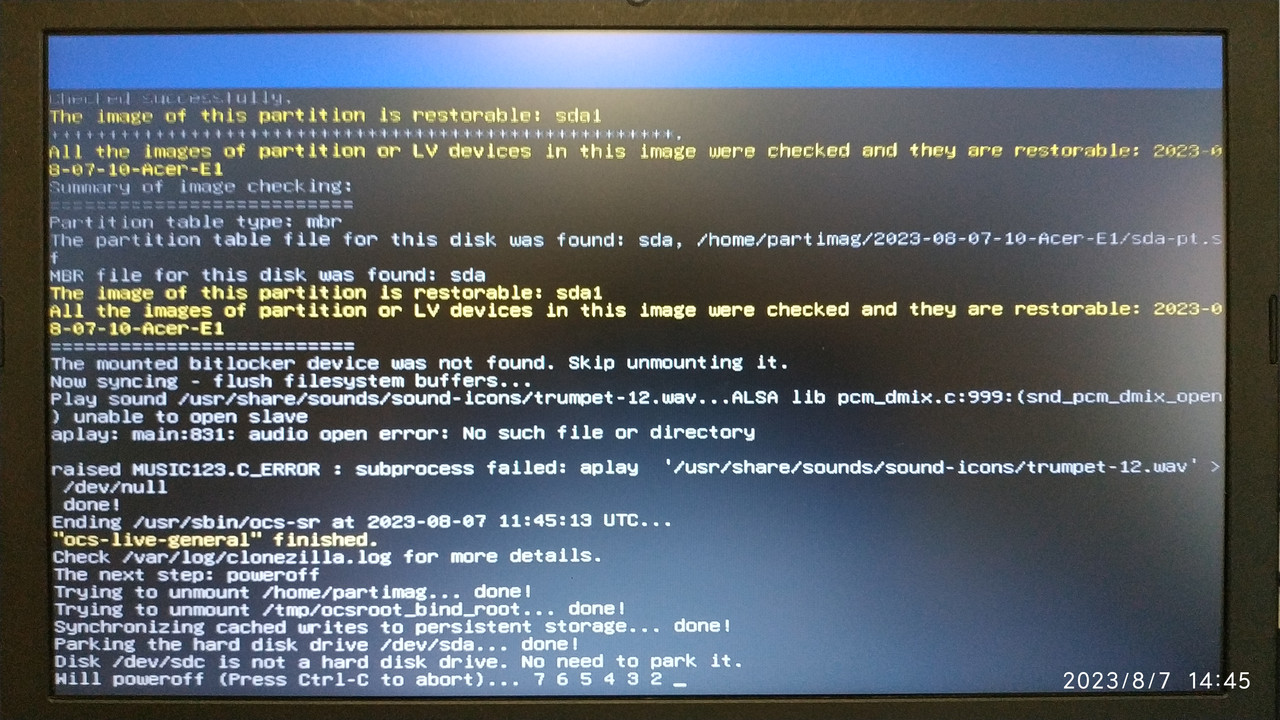
Actually this option will trigger this command:
music123 -q /usr/share/sounds/sound-icons/trumpet-12.wav
The key is your hardware is supported by the Linux kernel which Clonezilla live has.
You can try to run that command manually to see if it works or not.
Here we can play sound correctly on the machine we have.
Steven