
Menu
▾
▴

en-Install-MacOS
Installing BallroomDJ 4 on MacOS
Supported Platforms as of 2025-9: Big Sur, Monterey, Ventura, Sonoma, Sequoia, Tahoe.
If you want an earlier version supported, please let me know
Supported package managers as of 2025-11:
MacPorts, pkgsrc, homebrew (applesilicon)
At this time (2025-12-21), the pkgsrc build is not shipped. If you want to use pkgsrc, please contact the developers.
Updating BallroomDJ 4 : Make a Backup
Be sure to exit BallroomDJ 4 before creating a backup or updating the software.
If you are updating BallroomDJ 4 to a new version, be sure to create a backup of your BDJ4 installation. On MacOS make a copy of the $HOME/Applications/BDJ4.app folder and the $HOME/Library/Application Support/BDJ4 folder. If you use MacOS's time machine, have it do a backup before you proceed.
Internet Connection
An internet connection is required the first time BallroomDJ 4 is installed. There are requisite packages (VLC) that need to be installed from the internet, and the pre-install script requires an internet connection.
If the pre-install script has already been run, and VLC is already installed, no internet connection is required.
Install the Requisite Software
If a pre-install script before version 18 was run, you must re-run this script.
This step only needs to be run once, not for every installation or update. An internet connection is required to run this script. You may want to re-run the pre-install script once a year when you update.
As of 2025-11-24, the MacPorts package management system has a crash when the font selection button is used.
If BDJ4 is already installed on your MacOS system, you are using the MacPorts package management system.
MacPorts package management system:
Download the macos-pre-install-macports-v24.sh script.
If you wish to use the homebrew package management system,
Download the macos-pre-install-homebrew-v24.sh script.
Open a terminal (Finder / Go / Utilities / Terminal) and run this script using the following command. This may take a very long time to finish. You may be required to enter your administrative password more than once during the installation process.
If you are using the MacPorts package management system, use:
cd Downloads
bash macos-pre-install-macports-v24.sh
If you are using the homebrew package management system, use:
cd Downloads
bash macos-pre-install-homebrew-v24.sh
This script performs the following actions:
- Installs the required software used by BallroomDJ 4.
Note that this process can be very slow for new releases of MacOS.
Install BallroomDJ 4
Download the MacOS installer from sourceforge.
Be sure to select the correct architecture (Intel or Apple Silicon).
Be sure to select the correct package manager (macports or homebrew).
Also download the macos-run-install-v5.sh script from sourceforge. This script will set up and open the downloaded install package.
Make sure to exit BDJ4 if it is already started.
Open a terminal (Finder / Go / Utilities / Terminal) and run this script using the following command:
cd Downloads
bash macos-run-install-v5.sh
Choose the folder in which to install BallroomDJ 4. The $HOME/Applications/BDJ4.app folder will be pre-selected for you.
The Re-Install checkbox is only used if you want to completely reset all of the BDJ4 data files. Any changes you have made within BDJ4 will be lost if a re-install is done.
Select your preferred language. This language will be used to install the localized configuration files. The display language will also be set to this language, but may be changed later.
If you want to convert a BallroomDJ 3 installation, select the BallroomDJ 3 folder ($HOME/Library/Application Support/BallroomDJ) and select the Convert BallroomDJ 3 checkbox.
After you have selected the installation folder, select the Install or Upgrade button and wait for the Installation Completed message.
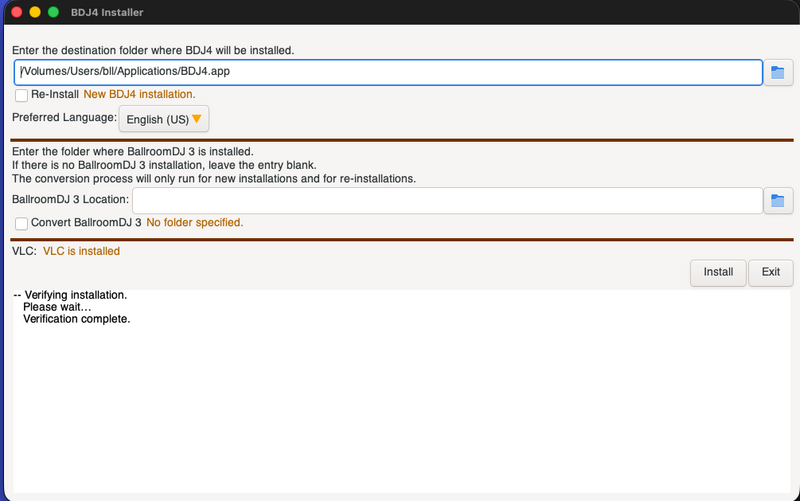
BallroomDJ 4 Installer on MacOS
If VLC is not already installed on your computer, the installation process will download and start the VLC installation. Drag the VLC.app icon to the Applications Folder icon.
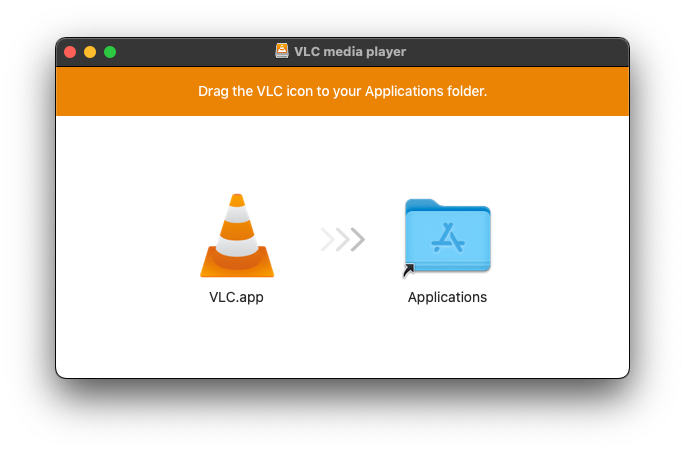
VLC Installation on MacOS
MacOS Native player interface
The MacOS AVPlayer native player interface is available that can be used instead of VLC. This interface supports cross-fading. This interface cannot play .ogx, .wma or .mkv files.
Getting Help
If you need help getting started, understanding how something in BDJ4 functions, or want to learn how to accomplish a particular goal in BDJ4, use one of the methods in Getting Help.
Getting Started with BDJ4
Visit the Getting Started with BDJ4 wiki page.
Notes on MacOS Package Managers
The following package managers are available for MacOS: MacPorts, pkgsrc and Homebrew.
MacPorts is very reliable, though sometimes slow, as not all packages have pre-built binaries (especially on newer releases of MacOS). MacPorts supports older versions of MacOS. MacPorts packages may not be fully up to date.
pkgsrc on MacOS is currently supported by a commercial company that has pre-built binary packages available. If this company goes away, the ability to use pkgsrc is questionable, as MacOS is not well supported.
Homebrew is very popular, as it installs pre-built binaries. Homebrew does not use elevated permissions (except during initial setup), and this setup creates a security hole. Homebrew does not support older MacOS versions.
On Intel MacOS, Homebrew refuses to make certain libraries available for easy use. This would make building BDJ4 extremely difficult, and also make a pre-built BDJ4 virtually impossible to run, as users may have different versions of these required libraries.
(Updated 2026-04-13 13:21:58; BDJ4 version 4.18.2)
Related
Wiki: Home
Wiki: en-Features
Wiki: en-Getting Help
Wiki: en-Install-Getting Started
Wiki: en-Install-Maintenance

