ANSI/ASCII Converter Blog
Converter for ANSI/ASCII Text Files
Status: Beta
Brought to you by:
cumbrowski

I saw this format first in the source code of an earlier version of PabloDraw by Curtis Wensley aka Eto and found it very useful.

I saw it again used for a EGA/VGA DOS Font collection from 1992 by Joseph (Yossi) Gil (fntcol16.zip), which also comes with a set of tools, such as BREAKCPI.COM, which breaks the current EGA.CPI into fonts or DUMPFONT.COM, which is another tool to extract system fonts.
The fonts are naturally all bitmap fonts, mono-spaced and monochrome (black/white). The size per character is usually one of the following (Width X Height in pixels): 8×8, 8×14 or 8×16 pixels. The font files in the collection by Joseph lack the "HEADER" though, meaning the width and height information are not part of the file. He simply used the file extensions "Fxx", where "xx" specified the height (width wasn't needed, because all his fonts had the same width (8 pixels)). Since I added a header to all the fonts in his collection and made it part of mine, you don't have to worry about that anymore. However, if you happen to use one of his tools to extract new fonts, you can add a header very easily by using the DOS command: "copy /b Fxx.BIN + FONTFILE.FNT NEWFONTFILE.FNT"
"Fxx.BIN" should be one of the files from this archive , depending on the font HEIGHT, e.g. F08.BIN or F16.BIN.
But enough of this and lets get to the actual stuff here.
The_ .FNT file format_ that I am introducing here allows for space efficient and relatively simple storage of monochrome (black/white) bitmap font information for the use in any kind of tool that need to emulate a specific and non-standard character set, such as the display of ANSI and ASCII text art from old MS DOS PC's or Commodore Amiga, Atari ST/Falcon 16 bit systems or PETSCII and ATASCII art from the Commodore 64 and Atari 400/800, ZX Spectrum, Apple II 8 Bit home computers.
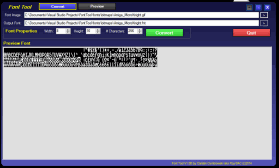
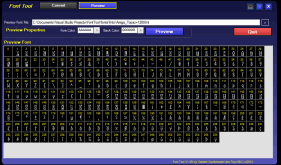
My font tool allows easy and quick conversion of bitmap representations of those fonts to a re-usable and generally compatible format to be used by programmers. It also has a preview feature to look at already converted .FNT files that you might get or download somewhere else.
Note: The Tool comes already with over 300 fonts, ready to use!
Offset Type Length Description Sample Value
0
Word
2
Character Width
08 00 = Width = 8 pixels
2
Word
2
Character Height
10 00 = Height = 16 pixels
4
Word
2
Number of Characters
00 01 = # Chars = 255
Each Point/Pixel is stored in a single bit. So for each row of a 8 pixels wide character 1 byte is used. For a 16 pixels per character wide font, 2 bytes would be used for a single row. The bit order is again little endian (right to left). Character data are stored line by line, so for an 8 pixels wide and 16 pixels high font, each character would take up 16 bytes, or 4,096 bytes for a complete set of 256 characters, making the resulting .FNT file including its 6 byte header 4,102 bytes in size.
Example for MS DOS Character 01 with character size 8 pixels wide and 16 pixels high:
Bits      Alt View*
00000000  ........
00000000  ........
01111110  .######.
10000001  #......#
10100101  #.#..#.#
10000001  #......#
10000001  #......#
10111101  #.####.#
10011001  #..##..#
10000001  #......#
10000001  #......#
01111110  .######.
00000000  ........
00000000  ........
00000000  ........
00000000  ........
*Alt View replaced 0 with . and 1 with # for better visualization
The Hex Values in the .FNT file look like this:
00 00 7E 81 A5 81 81 A5 99 81 81 7E 00 00 00 00
Again as a reminder:
Because of the Little Endian bit order the Characters appear mirrowed on the Y Axis (flip the bits in a byte) in the .FNT file.
Here is some sample source code for processing a .FNT font file with VB.NET
Public Module Sample
    Public Function ProcessFntFile(ByVal sFNTFile As System.String) _
                                  As System.Collections.Generic.List(Of System.Drawing.Bitmap)
        If sFNTFile = "" Then
            Return Nothing
            Exit Function
        Else
            If Not System.IO.File.Exists(sFNTFile) Then
                Return Nothing
                Exit Function
            End If
        End If
        Dim lstResults As New System.Collections.Generic.List(Of System.Drawing.Bitmap)
        Dim lstChars As New System.Collections.Generic.List(Of System.Byte(,))
        'Build a 16 colors MS DOS PC ANSI colors palette
        Dim pal As System.Drawing.Imaging.ColorPalette = BuildMSDOSAnsiColorsPalette()
        Dim bteFC As System.Byte = 7
        Dim bteBC As System.Byte = 0
        Dim fntBytes() As Byte = System.IO.File.ReadAllBytes(sFNTFile)
        Dim lngCurrPos As System.Int64 = 0
        Dim intCharWidth As System.Int32 = 0
        Dim intCharHeight As System.Int32 = 0
        Dim intNumChars As System.Int32 = 0
        intCharWidth = GetWordLE(fntBytes, lngCurrPos)
        intCharHeight = GetWordLE(fntBytes, lngCurrPos)
        intNumChars = GetWordLE(fntBytes, lngCurrPos)
        'Read all character information into a structered array
        'Dimension 1 contains all lines/rows and Dimension 2 the row details (point bits)
        For i As System.Int32 = 0 To intNumChars - 1
            Dim aChar(intCharHeight - 1, intCharWidth / 8 - 1) As System.Byte
            For y As System.Int32 = 0 To intCharHeight - 1
                For x As System.Int32 = 0 To intCharWidth / 8 - 1
                    aChar(y, x) = GetByte(fntBytes, lngCurrPos)
                Next
            Next
            lstChars.Add(aChar)
        Next
        For i As System.Int32 = 0 To lstChars.Count - 1
            Dim Img As New System.Drawing.Bitmap(intCharWidth, intCharHeight, _
                                        System.Drawing.Imaging.PixelFormat.Format4bppIndexed)
            Img.Palette = pal
            Dim bmpSr As System.Drawing.Imaging.BitmapData = Img.LockBits( _
                       New System.Drawing.Rectangle(0, 0, Img.Width, Img.Height), _
                       System.Drawing.Imaging.ImageLockMode.ReadWrite, _
                       Img.PixelFormat)
            Dim ptrSr As System.IntPtr = bmpSr.Scan0
            Dim bytesSr As System.Int32 = bmpSr.Stride * Img.Height
            Dim rgbvaluesSr(bytesSr) As System.Byte
            System.Runtime.InteropServices.Marshal.Copy(ptrSr, rgbvaluesSr, 0, bytesSr)
            Dim iPos As System.Int64 = 0
            Dim xOff As System.Int32 = 0
            Dim yOff As System.Int32 = 0
            For y As System.Int32 = 0 To intCharHeight - 1
                For x As System.Int32 = 0 To intCharWidth - 1
                    Dim arrPos As System.Int32 = Math.Floor((y * bmpSr.Stride) + (x / 2))
                    Dim cb As System.Int32 = Math.Floor(x / 8)
                    Dim bitpos As System.Byte = 8 - (x - cb * 8)
                    Dim wByte As System.Byte = rgbvaluesSr(arrPos)
                    If x Mod 2 <> 0 Then
                        'odd .. right part
                        rgbvaluesSr(arrPos) = (wByte - ((wByte << &H4) >> &H4)) + _
                                       IIf(ExamineBit(lstChars.Item(i)(y, cb), bitpos), bteFC, bteBC)
                    Else
                        'even .. left part
                        rgbvaluesSr(arrPos) = (wByte - ((wByte >> &H4) * 16)) + _
                                      (IIf(ExamineBit(lstChars.Item(i)(y, cb), bitpos), bteFC, bteBC) * 16)
                    End If

                Next
            Next
            System.Runtime.InteropServices.Marshal.Copy(rgbvaluesSr, 0, ptrSr, bytesSr)
            Img.UnlockBits(bmpSr)
            bmpSr = Nothing
            rgbvaluesSr = Nothing
            lstResults.Add(Img.Clone)
            Img.Dispose()
            Img = Nothing
        Next
        Return lstResults
    End Function

    ' The ExamineBit function will return True or False
    ' depending on the value of the 1 based, nth bit (MyBit)
    ' of an integer (MyByte).
    Public Function ExamineBit(ByVal MyByte As System.Byte, ByVal MyBit As System.Byte) _
                    As System.Boolean
        Dim BitMask As System.Int16
        MyByte = MyByte And &HFF
        BitMask = 2 ^ (MyBit - 1)
        Return ((MyByte And BitMask) > 0)
    End Function

    ' The SetBit Sub will set the 1 based, nth bit
    ' (MyBit) of an integer (MyByte).
    Public Sub SetBit(ByRef MyByte As System.Byte, ByVal MyBit As System.Byte)
        Dim BitMask As System.Int16
        MyByte = MyByte And &HFF
        BitMask = 2 ^ (MyBit - 1)
        MyByte = MyByte Or BitMask
    End Sub

    Public Function GetByte(ByVal arr() As System.Byte, ByRef lngPos As System.Int64) _
                            As System.Byte
        'Read a single byte from a byte array at specified position
        If lngPos < arr.Length Then
            lngPos += 1
            Return arr(lngPos - 1)
        Else
            Return 0
        End If
    End Function
    Public Function GetWordLE(ByVal arr() As System.Byte, ByRef lngPos As System.Int64) _
                              As System.UInt16
        'read 2 bytes into an unsigned 16 bit integer little endian
        If lngPos + 1 < arr.Length Then
            Return GetByte(arr, lngPos) + (GetByte(arr, lngPos) * 256)
        Else
            Return 0
        End If
    End Function

    Public Function BuildMSDOSAnsiColorsPalette() As System.Drawing.Imaging.ColorPalette
        Dim tmpImg As New System.Drawing.Bitmap(1, 1, _
                          System.Drawing.Imaging.PixelFormat.Format4bppIndexed)
        Dim pal As System.Drawing.Imaging.ColorPalette = tmpImg.Palette
        pal.Entries(0) = System.Drawing.Color.FromArgb(255, 0, 0, 0)
        pal.Entries(1) = System.Drawing.Color.FromArgb(255, 0, 0, 170)
        pal.Entries(2) = System.Drawing.Color.FromArgb(255, 0, 170, 0)
        pal.Entries(3) = System.Drawing.Color.FromArgb(255, 0, 170, 170)
        pal.Entries(4) = System.Drawing.Color.FromArgb(255, 170, 0, 0)
        pal.Entries(5) = System.Drawing.Color.FromArgb(255, 170, 0, 170)
        pal.Entries(6) = System.Drawing.Color.FromArgb(255, 170, 85, 0)
        pal.Entries(7) = System.Drawing.Color.FromArgb(255, 170, 170, 170)
        pal.Entries(8) = System.Drawing.Color.FromArgb(255, 85, 85, 85)
        pal.Entries(9) = System.Drawing.Color.FromArgb(255, 85, 85, 255)
        pal.Entries(10) = System.Drawing.Color.FromArgb(255, 85, 255, 85)
        pal.Entries(11) = System.Drawing.Color.FromArgb(255, 85, 255, 255)
        pal.Entries(12) = System.Drawing.Color.FromArgb(255, 255, 85, 85)
        pal.Entries(13) = System.Drawing.Color.FromArgb(255, 255, 85, 255)
        pal.Entries(14) = System.Drawing.Color.FromArgb(255, 255, 255, 85)
        pal.Entries(15) = System.Drawing.Color.FromArgb(255, 255, 255, 255)
        tmpImg.Dispose()
        tmpImg = Nothing
        Return pal
    End Function

End Module
Download the sample code fntsamplevbnet.zip
Here is some sample source code for processing a .FNT font file with CSharp (C#.NET)
/// <summary>
/// C# generated from VB.NET Code via
/// http://codeconverter.sharpdevelop.net/SnippetConverter.aspx
/// (with some manual tweaks done by hand afterwards)
/// This code is still untested though, but I am pretty confident
/// that it will work just fine as the VB.NET version does
/// Cheers! Carsten aka Roy/SAC
/// </summary>
public static class Sample {
    /// <summary>
    /// Reads a provided .FNT file and returns a list of images,
    /// one image for each character in the font set
    /// </summary>
    /// <param name="sFNTFile"></param>
    /// <returns></returns>
    public static System.Collections.Generic.List<System.Drawing.Bitmap> ProcessFntFile(
                                           System.String sFNTFile) {
        if (string.IsNullOrEmpty(sFNTFile)) {
            return null;
        } else {
            if (!System.IO.File.Exists(sFNTFile)) {
                return null;
            }
        }
        System.Collections.Generic.List<System.Drawing.Bitmap> lstResults =
                     new System.Collections.Generic.List<System.Drawing.Bitmap>();
        System.Collections.Generic.List<System.Byte[,]> lstChars =
                     new System.Collections.Generic.List<System.Byte[,]>();
        //Build a 16 colors MS DOS PC ANSI colors palette
        System.Drawing.Imaging.ColorPalette pal = BuildMSDOSAnsiColorsPalette();
        System.Byte bteFC = 7;
        System.Byte bteBC = 0;
        byte[] fntBytes = System.IO.File.ReadAllBytes(sFNTFile);
        System.Int64 lngCurrPos = 0;
        System.Int32 intCharWidth = 0;
        System.Int32 intCharHeight = 0;
        System.Int32 intNumChars = 0;
        intCharWidth = GetWordLE(fntBytes, ref lngCurrPos);
        intCharHeight = GetWordLE(fntBytes, ref lngCurrPos);
        intNumChars = GetWordLE(fntBytes, ref lngCurrPos);
        //Read all character information into a structered array
        //Dimension 1 contains all lines/rows and Dimension 2 the row details (point bits)
        for (System.Int32 i = 0; i <= intNumChars - 1; i++)  {
            System.Byte[,] aChar = new System.Byte[intCharHeight, intCharWidth / 8];
            for (System.Int32 y = 0; y <= intCharHeight - 1; y++) {
                for (System.Int32 x = 0; x <= intCharWidth / 8 - 1; x++) {
                    aChar[y, x] = GetByte(fntBytes, ref lngCurrPos);
                }
            }
            lstChars.Add(aChar);
        }
        for (System.Int32 i = 0; i <= lstChars.Count - 1; i++) {
            System.Drawing.Bitmap oImg = new System.Drawing.Bitmap(intCharWidth, intCharHeight,
                                          System.Drawing.Imaging.PixelFormat.Format4bppIndexed);
            oImg.Palette = pal;
            System.Drawing.Imaging.BitmapData bmpSr =
                       oImg.LockBits(new System.Drawing.Rectangle(0, 0, oImg.Width, oImg.Height),
                               System.Drawing.Imaging.ImageLockMode.ReadWrite, oImg.PixelFormat);
            System.IntPtr ptrSr = bmpSr.Scan0;
            System.Int32 bytesSr = bmpSr.Stride * oImg.Height;
            System.Byte[] rgbvaluesSr = new System.Byte[bytesSr + 1];
            System.Runtime.InteropServices.Marshal.Copy(ptrSr, rgbvaluesSr, 0, bytesSr);
            for (System.Int32 y = 0; y <= intCharHeight - 1; y++) {
                for (System.Int32 x = 0; x <= intCharWidth - 1; x++) {
                    System.Int32 arrPos = (int)(System.Math.Floor((y * bmpSr.Stride) + ((float)x / 2)));
                    System.Int32 cb = (int)System.Math.Floor((float)x / 8);
                    System.Byte bitpos = (byte)(8 - ((int)x - (int)cb * 8));
                    System.Byte wByte = rgbvaluesSr[arrPos];
                    if (x % 2 != 0) {
                        //odd .. right part
                        rgbvaluesSr[(int)arrPos] =
                                (byte)((wByte - (byte)(((byte)wByte << (byte)0x4) >> (byte)0x4))
                                + (byte)((ExamineBit(lstChars[i][y, cb], bitpos) ? bteFC : bteBC)));
                    } else {
                        //even .. left part
                        rgbvaluesSr[(int)arrPos] = (byte)((wByte - ((wByte >> 0x4) * 16)) +
                            ((ExamineBit(lstChars[i][y, cb], bitpos) ? bteFC : bteBC) * (byte)16));
                    }
                }
            }
            System.Runtime.InteropServices.Marshal.Copy(rgbvaluesSr, 0, ptrSr, bytesSr);
            oImg.UnlockBits(bmpSr);
            bmpSr = null;
            rgbvaluesSr = null;
            lstResults.Add((System.Drawing.Bitmap) oImg.Clone());
            oImg.Dispose();
            oImg = null;
        }
        return lstResults;
    }

    /// <summary>
    /// The ExamineBit function will return True or False
    /// depending on the value of the 1 based, nth bit (MyBit)
    /// of an integer (MyByte).
    /// </summary>
    /// <param name="MyByte"></param>
    /// <param name="MyBit"></param>
    /// <returns></returns>
    public static System.Boolean ExamineBit(System.Byte MyByte, System.Byte MyBit) {
        System.Int16 BitMask = 0;
        MyByte = (byte)(MyByte & 0xff);
        BitMask = (byte)(System.Math.Pow(2, (MyBit - 1)));
        return ((MyByte & BitMask) > 0);
    }

    /// <summary>
    /// The SetBit Sub will set the 1 based, nth bit (MyBit)
    /// of an integer (MyByte).
    /// </summary>
    /// <param name="MyByte"></param>
    /// <param name="MyBit"></param>
    public static void SetBit(ref System.Byte MyByte, System.Byte MyBit) {
        System.Int16 BitMask = 0;
        MyByte = (byte)(MyByte & 0xff);
        BitMask = (byte)(System.Math.Pow(2, (MyBit - 1)));
        MyByte = (byte)(MyByte | (byte)BitMask);
    }
    /// <summary>
    /// Read a single byte from a byte array at specified position
    /// </summary>
    /// <param name="arr"></param>
    /// <param name="lngPos"></param>
    /// <returns></returns>
    public static System.Byte GetByte(System.Byte[] arr, ref System.Int64 lngPos) {
        if (lngPos < arr.Length) {
            lngPos += 1;
            return arr[lngPos - 1];
        } else {
            return 0;
        }
    }
    /// <summary>
    /// read 2 bytes into an unsigned 16 bit integer little endian
    /// </summary>
    /// <param name="arr"></param>
    /// <param name="lngPos"></param>
    /// <returns></returns>
    public static System.UInt16 GetWordLE(System.Byte[] arr, ref System.Int64 lngPos) {
        if (lngPos + 1 < arr.Length) {
            return (ushort)(GetByte(arr, ref lngPos) + (GetByte(arr, ref lngPos) * 256));
        } else {
            return 0;
        }
    }
    /// <summary>
    /// Build Ansi Colors Image Palette (16 Colors)
    /// </summary>
    /// <returns></returns>
    public static System.Drawing.Imaging.ColorPalette BuildMSDOSAnsiColorsPalette() {
        System.Drawing.Bitmap tmpImg = new System.Drawing.Bitmap(1, 1,
                          System.Drawing.Imaging.PixelFormat.Format4bppIndexed);
        System.Drawing.Imaging.ColorPalette pal = tmpImg.Palette;
        pal.Entries[0] = System.Drawing.Color.FromArgb(255, 0, 0, 0);
        pal.Entries[1] = System.Drawing.Color.FromArgb(255, 0, 0, 170);
        pal.Entries[2] = System.Drawing.Color.FromArgb(255, 0, 170, 0);
        pal.Entries[3] = System.Drawing.Color.FromArgb(255, 0, 170, 170);
        pal.Entries[4] = System.Drawing.Color.FromArgb(255, 170, 0, 0);
        pal.Entries[5] = System.Drawing.Color.FromArgb(255, 170, 0, 170);
        pal.Entries[6] = System.Drawing.Color.FromArgb(255, 170, 85, 0);
        pal.Entries[7] = System.Drawing.Color.FromArgb(255, 170, 170, 170);
        pal.Entries[8] = System.Drawing.Color.FromArgb(255, 85, 85, 85);
        pal.Entries[9] = System.Drawing.Color.FromArgb(255, 85, 85, 255);
        pal.Entries[10] = System.Drawing.Color.FromArgb(255, 85, 255, 85);
        pal.Entries[11] = System.Drawing.Color.FromArgb(255, 85, 255, 255);
        pal.Entries[12] = System.Drawing.Color.FromArgb(255, 255, 85, 85);
        pal.Entries[13] = System.Drawing.Color.FromArgb(255, 255, 85, 255);
        pal.Entries[14] = System.Drawing.Color.FromArgb(255, 255, 255, 85);
        pal.Entries[15] = System.Drawing.Color.FromArgb(255, 255, 255, 255);
        tmpImg.Dispose();
        tmpImg = null;
        return pal;
    }

}
Download the sample code fntsamplec#net.zip
Enjoy!
Carsten aka Roy/SAC
I saw this format first in the source code of an earlier version of PabloDraw by Curtis Wensley aka Eto and found it very useful. I saw it again used for a EGA/VGA DOS Font collection from 1992 by Joseph (Yossi) Gil (fntcol16.zip), which also comes with a set of tools, such as BREAKCPI.COM, which breaks the current EGA.CPI into fonts or DUMPFONT.COM, which is another tool to extract system fonts. The fonts are naturally all bitmap fonts, mono-spaced and monochrome (black/white). The size per character is usually one of the following (Width X Height in pixels): 8×8, 8×14 or 8×16 pixels. The font files in the collection by Joseph lack the "HEADER" though, meaning the width and height information are not part of the file. He simply used the file extensions "Fxx", where "xx" specified the height (width wasn't needed, because all his fonts had the same width (8 pixels)). Since I added a header to all the fonts in his collection and made it part of mine, you don't have to worry about that anymore. However, if you happen to use one of his tools to extract new fonts, you can add a header very easily by using the DOS command: "copy /b Fxx.BIN + FONTFILE.FNT NEWFONTFILE.FNT" "Fxx.BIN" should be one of the files from this archive , depending on the font HEIGHT, e.g. F08.BIN or F16.BIN. But enough of this and lets get to the actual stuff here. The .FNT file format that I am introducing[...]
link
 2014-08-31
